Workflow approvals
Review, approve, or reject human-in-the-loop workflow requests directly from the Runtime approval queue.
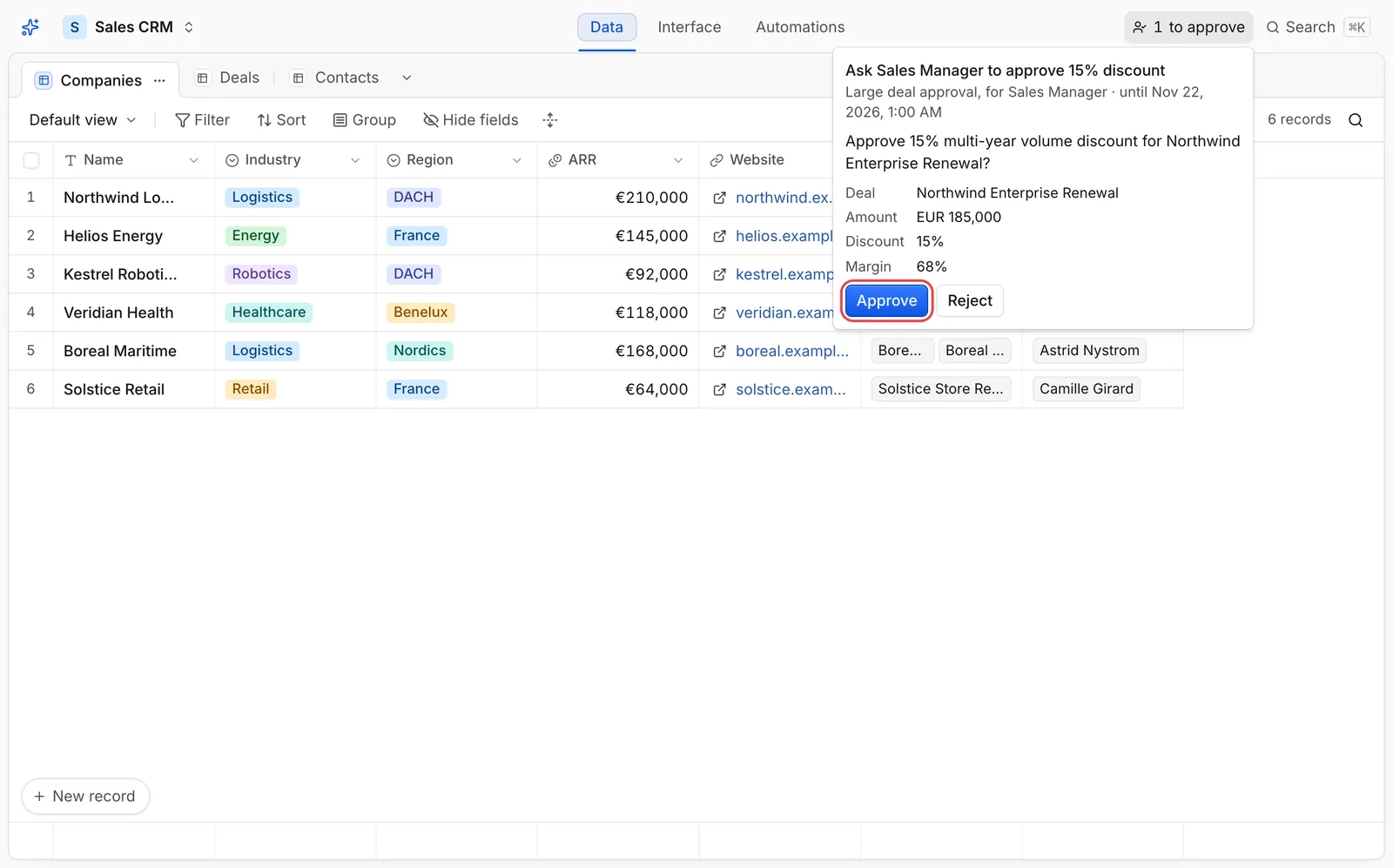
Grid82 workflows can pause mid-execution with approval.ask and wait for a human decision from a specific role. Whenever a workflow waits on one of your roles, the top bar displays a live to approve counter.
Reviewing a request
Click to approve in the header to open the pending queue:
- Read the question configured by the workflow author (for example, approving an enterprise deal discount).
- Inspect the context summary shown on the card. Workflows pass only the fields listed in
show, letting approvers verify the key facts directly. - Add an optional decision note explaining your reasoning (saved with the approval record for auditing).
- Click Approve (ringed in red) or Reject.
What happens after you decide
- The paused workflow wakes up immediately and receives
{ approved: true | false, by, at, note }. - Your decision is stamped with your user identity and removed from the queue for other members of the same role so a request cannot be approved twice.
- If no member decides before the workflow’s timeout (default 7 days, up to 30 days), the request expires with
{ approved: false, timedOut: true }and clears from the queue. - You can also list and decide pending approvals programmatically via
approvals.listandapprovals.decide, or through MCP.